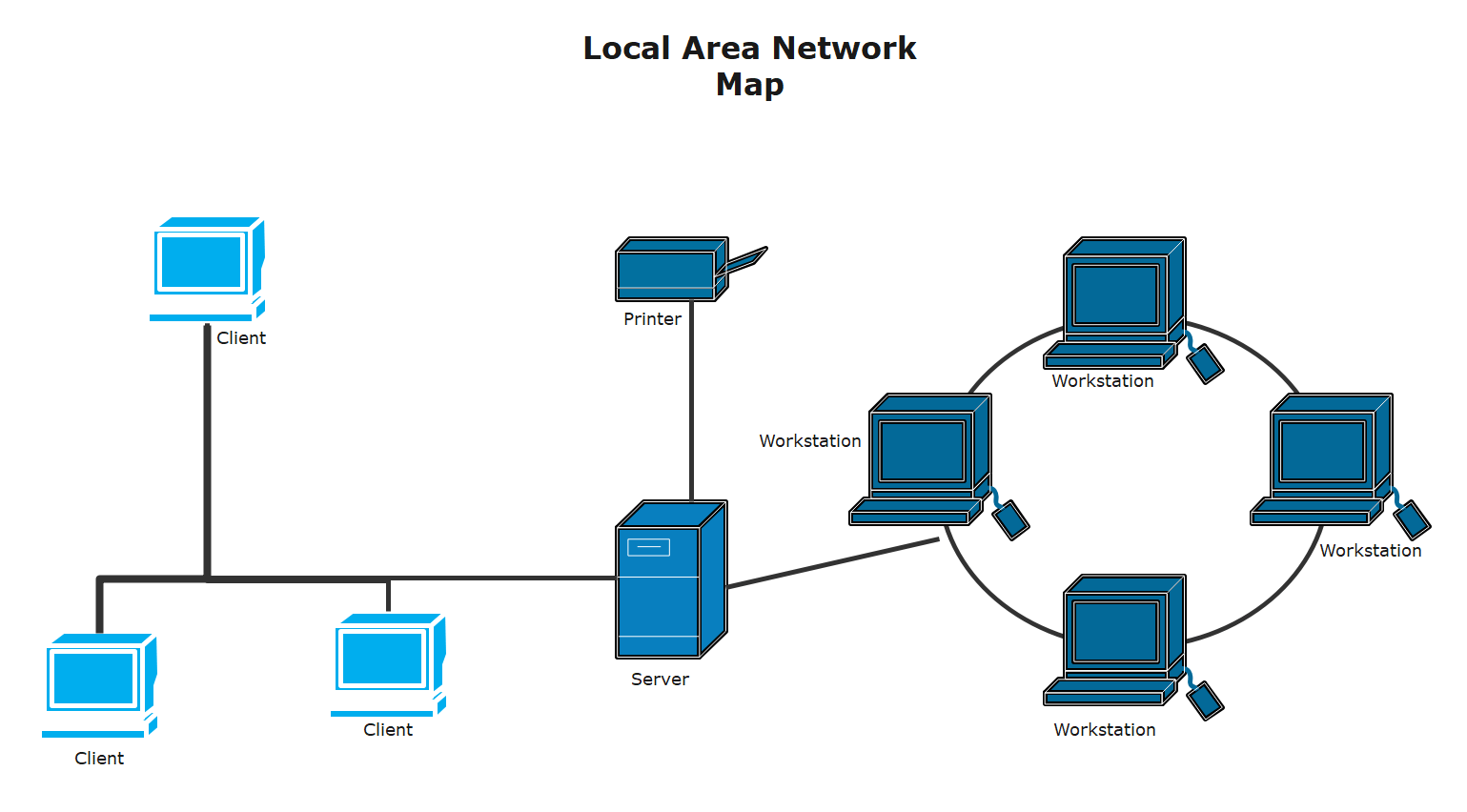
Ask five people in IT what a network map is and you will probably get five different answers. Some picture a diagram taped up near the server rack. Others think of software that pings every device on the office Wi-Fi and spits out a chart with little icons on it. Both are right, in a way. A network map is simply a picture of how everything on your network connects, but what goes into that picture, and how it actually gets used, depends a lot on who is looking at it.
If you have never built one, or you inherited a “map” that is really just a two-year-old PDF nobody trusts anymore, here is what actually matters.
What a network map actually shows
At the most basic level, a network map lays out every device, connection, and pathway inside your network, and shows how they relate to each other. That includes routers, switches, firewalls, servers, and increasingly, virtual machines and cloud resources that do not sit in a rack at all.
There are usually two layers to this. A physical map shows the actual hardware and cabling, the sort of thing an electrician would appreciate. A logical map shows how traffic moves, which subnets talk to which, how routing is set up, and where the VLANs split off. Most teams eventually need both, even if they live in separate documents.
Is a network map the same thing as a network diagram?
Mostly, yes, and people use the terms interchangeably without causing much confusion. If there is a difference, it is that “diagram” sometimes implies a simpler, more static drawing, while “map” can suggest something closer to a live, continuously updated view. In practice, nobody is going to correct you for mixing the two up.
Why teams actually bother keeping one updated
A stale network map is arguably worse than no map at all, because people trust it right up until it sends them chasing a device that got decommissioned eight months ago. Teams that keep theirs current tend to do it for a handful of practical reasons.
Troubleshooting gets faster, because instead of checking devices one by one when something breaks, engineers can look at the map and narrow down where the problem likely sits. Security audits go smoother, since regulators and auditors usually want to see documented network segmentation, not a verbal explanation. New hires ramp up quicker, because a current map hands them the mental model that used to live only in one senior engineer’s head. And capacity planning gets grounded in reality instead of guesswork, since you can see exactly where traffic is concentrated before you add another hundred users to a segment that is already stretched thin.
What belongs on a solid map
A useful map usually includes the devices themselves along with their IP ranges, the links between them and roughly how much bandwidth each one carries, the physical location of each site or rack, any redundant or backup paths, and who owns or manages each piece, whether that is an internal team or an outside vendor.
It is easy to overdo this. A map crammed with every port number and firmware version becomes unreadable fast. Most teams are better off keeping a clean, high-level map for quick reference and a separate, detailed inventory for the deep technical work.
A quick example at a much larger scale
Everything above applies whether you are mapping a single office LAN or something far bigger. It helps to see what this looks like once you zoom out. RETN, a Eurasian fiber backbone operator, publishes its own network map showing how its points of presence and long-haul routes are laid out across dozens of cities. It is a good reference point for what a clear, carrier-scale map looks like once you have hundreds of sites instead of a dozen.
How to build one without losing a weekend to it
Start with an automated discovery tool if you can. Most modern network monitoring platforms will scan your environment using SNMP, ARP, or similar protocols and generate a rough first draft on their own, which saves you from typing out every switch by hand. From there, layer in the details a scanner cannot know on its own, things like which vendor supports which device, or which link is the failover path rather than the primary one. Set a recurring reminder, quarterly works for most teams, to review the map against what actually changed. And give one person, or one small team, clear ownership of keeping it current, because a map nobody owns is a map nobody trusts.
Mistakes that quietly make a map useless
The most common one is simply letting it go stale after the initial burst of effort that created it. Close behind that is cramming in too much or too little detail, so it is either overwhelming or too vague to act on. Mixing physical and logical information on the same diagram without labeling clearly which trips up a lot of people too. And skipping ownership is its own quiet failure mode, since a map with no clear owner tends to drift out of date within a few months.
Frequently Asked Questions
What is the difference between a network map and network topology?
Network topology is the actual physical or logical arrangement of your network. A network map is the visual document that represents that topology. The topology is the reality; the map is the picture of it.
Do small businesses really need a network map?
Yes, even a business with ten employees and one office benefits from a simple map. It shortens troubleshooting time and makes it much easier to bring on a new IT contractor without a long handover conversation.
How often should a network map be updated?
Quarterly is a reasonable baseline for most small and mid-sized networks. Larger or fast-changing environments, especially ones with a lot of cloud infrastructure, often benefit from automated tools that update the map continuously.
What tools can I use to build one without spending money?
Free and low-cost options include Nmap paired with a visualization tool, draw.io for manual diagrams, and the free tiers of several commercial network monitoring platforms that include basic mapping features.
Is a network map the same as cable documentation for a server room?
Not quite. Cable documentation focuses narrowly on physical wiring and port assignments. A network map is broader, covering how devices and traffic relate to each other logically, not just how the cables are run.